Command If…Else…ElseIf…End If
This command allows taking decisions during a script’s execution. The syntax is the following:
If condition Then
code that will be executed if the condition is true.
Else
code that will be executed if the condition is NOT true.
End if
Examples:
If Engine=0 Then
Text=”Engine off”
Else
Text=”Engine on”
End if
More than one condition can be verified in the same command:
If Then
code that will be executed if condition1 is true.
Elseif Then
code that will be executed if condition2 is true.
Elseif <condition3> Then
code that will be executed if condition3 is true.
Else
code that will be executed if none of the conditions is true.
End if
Examples:
If Engines=0 then
Text=”Engines off”
Elseif Engines=1 then
Text=”Engine 1 on”
Elseif Engines=2 then
Text=”Engine 2 on”
Elseif Engines=3 then
Text=”Engines 1 and 2 on”
Else
Text=”Status error. Check the engines”
End if
Exercises:
1. Write the code for the following dialog boxes and display on a second message the user’s answer [(Yes or No) and (Retry or Cancel)].
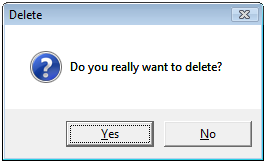
Figure 9
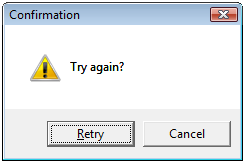
Figure 10
2. Create a setpoint that only allows typing values.
3. By changing setpoint’s value, modify a rectangle’s color by script, according to the chart below. For any value that is not in the chart, the rectangle should be black.
| Minimum | Maximum | Color |
| 0 | 10 | Blue |
| 10 | 50 | Green |
| 50 | 70 | Yellow |
| 70 | 100 | Red |
Select Case Command
This command executes one chosen case among several instructions groups. The syntax is:
Select Case
Case
Case
End Select
Examples:
Select Case Engines
Case 0
Text=”Engines off”
Case 1
Text=”Engine 1 on”
Case 2
Text=”Engine 2 on”
Case 3
Text=”Engines 1 and 2 on”
Case else
Text=”Status Error. Verify the engines”
End select
Exercises:
4. Insert two screens in your application.
5. Create a menu with the name of all the screens, using SelectMenu method from the E3 Viewer.
6. By clicking on screen’s name on the menu, open the selected screen.
Attachments: