A Message Box displays a dialog box and expects the user to click on a button, returning an indicator value from the clicked button.
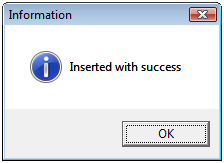
Figure 1
The syntax is the following:
MsgBox(Message, Buttons, Title)
Where:
Message: Text that is going to be displayed on the dialog box
Buttons: See table below
Title: Message Box title
| CONSTANT | VALUE | DESCRIPTION |
| vbOKOnly | 0 | Displays the OK button |
| vbOKCancel | 1 | Displays OK and Cancel buttons |
| vbAbortRetryIgnore | 2 | Displays Abort, Retry, and Ignore buttons |
| vbYesNoCancel | 3 | Displays Yes, No, and Cancel buttons |
| vbYesNo | 4 | Displays Yes and No buttons |
| vbRetryCancel | 5 | Displays Retry and Cancel buttons |
| VbCritical | 16 | Displays Critical icon  |
| vbQuestion | 32 | Displays Question icon  |
| vbExclamation | 48 | Displays Exclamation icon  |
| vbInformation | 64 | Displays Information icon  |
| vbDefaultButton1 | 0 | Sets 1st button as default |
| vbDefaultButton2 | 256 | Sets 2nd button as default |
| vbDefaultButton3 | 512 | Sets 3rd button as default |
| vbDefaultButton4 | 768 | Sets 4th button as default |
| vbApplicationModal | 0 | Modal Application. The user must respond to the Message Box before continuing working in the application. |
| vbSystemModal | 4096 | Modal System. All applications are suspended until the user responds to the Message Box. |
The MsgBox function returns the following values:
| CONSTANT | VALUE | DESCRIPTION |
| vbOK | 1 | OK |
| vbCancel | 2 | Cancel |
| vbAbort | 3 | Abort |
| vbRetry | 4 | Retry |
| vbIgnore | 5 | Ignore |
| vbYes | 6 | Yes |
| vbNo | 7 | No |
For the example in Figure 1, we wrote the following code line:
MsgBox “Message Text”, vbAbortRetryIgnore + vbCritical, “Message title”
If you wish to keep the user’s answer, the function parameters must be between parentheses:
‘Question
resp = MsgBox(“Message text”, vbAbortRetryIgnore + vbCritical, “Message title”)
‘Answer
MsgBox “The user answered” & resp
Exercises:
1. Write the code for the following dialog boxes:
Figure 2
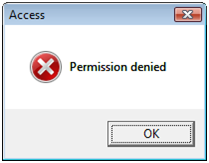
Figura 3
2. Write the code for the following dialog boxes and display on a second message the user’s answer.
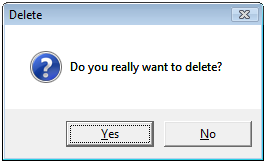
Figure 4
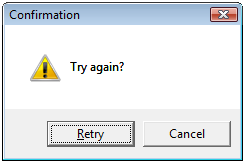
Figure 5
Attachments: