Introdução
O driver Elipse GenericProtocol permite implementar protocolos de comunicação personalizados de forma flexível, utilizando estruturas ASCII ou binárias. Sua principal vantagem é possibilitar a integração com equipamentos que utilizam protocolos proprietários ou formatos específicos de comunicação, sem a necessidade de desenvolvimento de um driver dedicado.
Neste artigo, é apresentado um exemplo de utilização do GenericProtocol com o protocolo NMEA 0183, amplamente utilizado em receptores GPS/GNSS, sensores marítimos e dispositivos de navegação.
Exemplo de aplicação
O protocolo NMEA-0183 utiliza mensagens ASCII estruturadas em sentenças padronizadas, normalmente iniciadas pelo caractere “$” e finalizadas por < CR >< LF >. Cada sentença contém informações específicas relacionadas à navegação e ao posicionamento geográfico.
Entre os principais dados disponíveis nas mensagens NMEA, destacam-se:
- Latitude e longitude
- Velocidade
- Altitude
- Hora UTC
- Status do sinal GPS
- Dados de navegação
Um exemplo de sentença NMEA é apresentado abaixo:
$GPGGA,123519,4807.038,N,01131.000,E,1,08,0.9,545.4,M,46.9,M,,*47
Na tabela abaixo, são apresentados alguns campos dessa mensagem:
| Campo | Descrição |
|---|---|
| GPGGA | Tipo da mensagem |
| 123519 | Hora UTC |
| 4807.038,N | Latitude |
| 01131.000,E | Longitude |
| 1 | Qualidade do sinal |
| 08 | Número de satélites |
Devido à sua estrutura simples e baseada em delimitadores ASCII, o protocolo NMEA 0183 é especialmente adequado para implementação utilizando o driver Elipse GenericProtocol.
Recursos do GenericProtocol aplicados ao NMEA 0183
Utilizando o GenericProtocol, é possível:
- Configurar delimitadores de início e fim da sentença
- Separar os campos utilizando o caractere “,”
- Validar o checksum da mensagem NMEA
- Criar Tags automaticamente para latitude, longitude, velocidade e demais informações
- Interpretar diferentes tipos de sentenças NMEA
Esse tipo de integração é frequentemente utilizado em:
- Sistemas de rastreamento
- Supervisão de embarcações
- Monitoramento de veículos
- Aplicações meteorológicas
- Sistemas de navegação e georreferenciamento
Estrutura básica do protocolo NMEA 0183
As mensagens NMEA seguem uma estrutura padronizada:
$TTMMM,d1,d2,...,dN*HH< CR >< LF >
Onde:
| Campo | Descrição |
|---|---|
$ |
Início da sentença |
TT |
Talker ID — identifica o dispositivo emissor |
MMM |
Tipo de sentença (3 a 5 letras) |
d1,d2,... |
Campos de dados separados por vírgula |
*HH |
Checksum XOR de todos os bytes entre $ e * |
< CR >< LF > |
Terminador (\r\n) |
Exemplo de configuração utilizando o GenericProtocol
A seguir é apresentado um arquivo exemplo de configuração XML para interpretação de mensagens NMEA 0183 utilizando o driver GenericProtocol.
Carregando o projeto XML existente
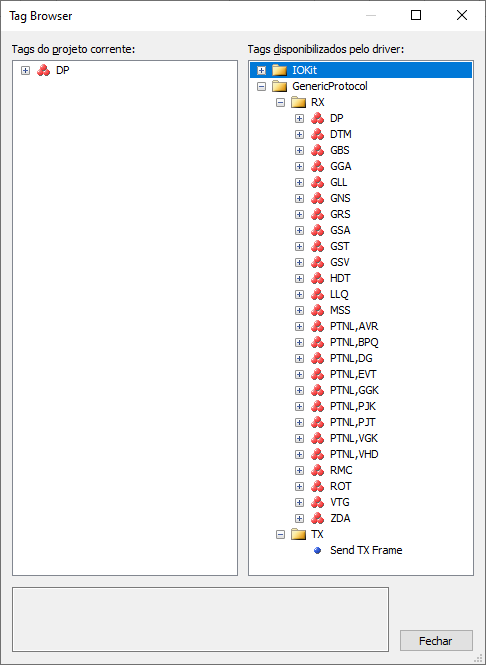
Após a implementação do arquivo XML do protocolo, é possível carregá-lo diretamente no driver utilizando a opção Existing Project.
Essa opção permite selecionar um arquivo de projeto existente no formato XML do driver, facilitando a reutilização de configurações já implementadas.
Para isso:
- Acesse as propriedades do driver GenericProtocol
- Localize a aba de configuração do projeto
- Selecione a opção Existing Project
- Informe o arquivo XML previamente criado
Com isso, toda a estrutura do protocolo, incluindo mensagens, delimitadores, campos e Tags, é carregada automaticamente pelo driver.
Benefícios da utilização do GenericProtocol
A utilização do GenericProtocol para comunicação com dispositivos NMEA 0183 oferece diversas vantagens:
- Redução do tempo de integração
- Flexibilidade para adaptação a protocolos proprietários
- Facilidade de manutenção
- Configuração baseada em XML
- Criação automática de Tags
- Reaproveitamento de configurações entre projetos
Conclusão
O driver Elipse GenericProtocol oferece uma solução flexível e eficiente para integração com equipamentos que utilizam protocolos ASCII estruturados, como o NMEA 0183.
Graças à sua configuração baseada em XML, é possível interpretar diferentes tipos de sentenças NMEA, validar mensagens e disponibilizar informações de navegação diretamente em aplicações supervisórias.
Esse tipo de integração é amplamente utilizado em sistemas de rastreamento, monitoramento e navegação, permitindo rápida implementação e elevada flexibilidade de comunicação.
Referências
Documentação oficial do protocolo NMEA 0183 da Trimble:
https://receiverhelp.trimble.com/alloy-gnss/en-us/NMEA-0183messages_MessageOverview.html
Artigos Relacionados

Muito bom! Implementei a leitura do NMEA usando o driver ASCII, mas com esse driver fica muito mais simples.